


Squarespace Code Backup Chrome Extension
One-click backups of your Custom CSS and Code Injection, saved to your Google Drive with full version history. Built by Squarespace designers, for Squarespace designers.
Never lose your custom code again
Automatic backups of CSS & Code Injection
Sync to Google Drive for safe storage
Version history to restore anytime
One Subscription, Unlimited Squarespace Sites
Then just £5/month · Cancel anytime · No card tricks

Google OAuth
Secured

Stored in Your
Google Drive
Built by Squarespace Circle Leaders
We've all been there.
You're deep in a client's Squarespace site. You've been tweaking CSS for an hour — the nav looks perfect, the spacing is spot on, the hover states are silky smooth.
Then you accidentally overwrite it. Or Squarespace glitches. Or your browser crashes mid-save.
And it's gone.
No undo button. No revision history. No backup. Just you, a blank code editor, and the sinking feeling that you're about to spend the next two hours rewriting everything from memory.
Squarespace doesn't back up your custom code. Not your CSS. Not your Code Injection. Not the Header, Footer, Lock Page, Order Confirmation, or Order Status code. None of it.
If something goes wrong, you're on your own.
Until now.
Without Squarespace Code Backup
Copying code into random text files you'll never find again
“backup_v3_FINAL(2).txt" sitting in your Downloads folder
No idea what you changed or when you changed it
Hoping the browser undo button saves you
Panic when a client says “it looked different yesterday"
Spending an hour rewriting code from memory
With Squarespace Code Backup
Every version automatically saved to your Google Drive
Clean, organised folders — one per site
Full version history with timestamps and notes
One-click copy from any previous version
Side-by-side comparison showing exactly what changed
10 seconds to roll back to the version that worked
Meet Squarespace Code Backup.
A Chrome extension that quietly backs up every line of custom code on your Squarespace site — and saves it straight to your own Google Drive.
No more copying and pasting into text files. No more "I'll back it up later" that never happens. No more hoping for the best.
Install it, sign in with Google, and open any Squarespace site. The backup panel sits right inside your Squarespace admin — matching the dark theme you're already used to. It feels native because it's designed to be.
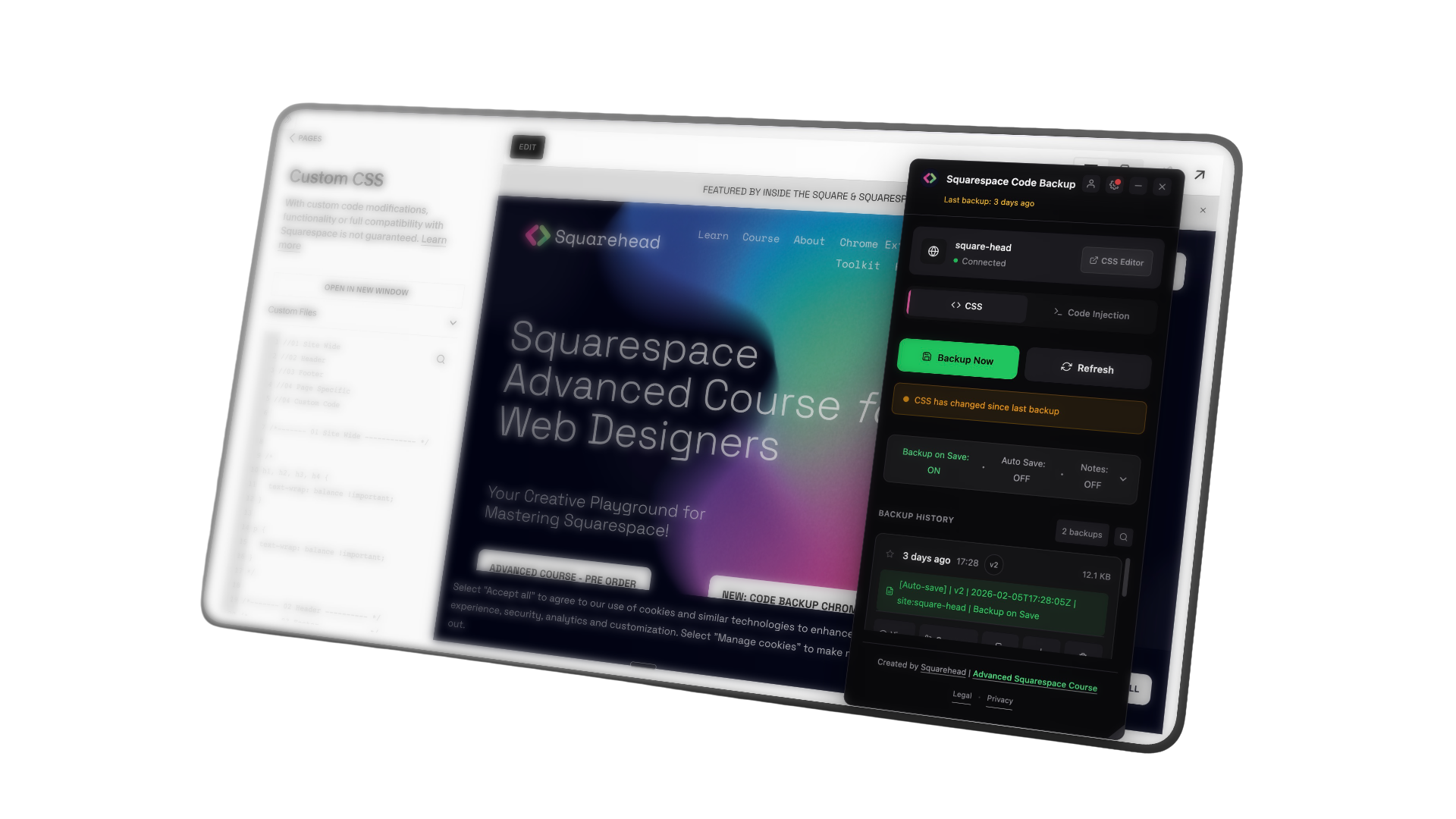
Three steps. That's it.

Install
Add it from the Chrome Web Store.
Takes about ten seconds.

Sign In
Connect your Google account. Your backups go straight to your own Google Drive — we never see or store your code.

Back Up
Open any Squarespace site, navigate to Custom CSS or Code Injection, and click backup. Done.
“For any serious Squarespace developer using code injection, this is an essential tool. At FuseHub, we no longer worry about backing up code or storing it safely in case of issues — that is solved.”

“If you touch custom code in Squarespace at all, this is a no-brainer. I used to have so many “clientname-date-version-FINAL-headercodeinjection.html” files on my computer. Now with this plugin, I can automatically back up my CSS and Code Injection to my own Google Drive with full version history, so you’re not stressing about losing work or trying to remember what changed. Set it up once and move on. It just quietly does its job, which is exactly what you want from something this important.”
Built for the people who build Squarespace sites.
Freelance Web Designers You manage code across dozens of client sites. Losing a single line means hours of rework and awkward client conversations. This means you never have to.
DIY Site Owners You've followed tutorials and added custom CSS to get your site looking just right. If it vanished tomorrow, could you recreate it? Now you don't have to worry about that.
Design Agencies Multiple designers, multiple sites, multiple chances for something to go wrong. Give your whole team a safety net.
Squarespace Developers You write serious Code Injection — scripts, tracking, custom functionality. You need proper version control, not a text file called "code backup FINAL (2).txt."
Frequently Asked Questions
-
Squarespace Code Backup is a Chrome extension that automatically backs up your Custom CSS and Code Injection code to your own Google Drive. It provides version history, comparison tools, and one-click restore so you never lose your custom code.
-
Visit the Chrome Web Store, search for "Squarespace Code Backup", or just use this link and click "Add to Chrome". Once installed, you'll see the extension icon in your browser toolbar.
-
Navigate to any Squarespace site's CSS editor or Code Injection page
The backup panel will appear automatically
Click "Connect Google Drive" and sign in with your Google account
Click "Backup Now" to create your first backup
-
Yes! The extension works with both Squarespace 7.0 and 7.1 sites. It detects the CSS editor and Code Injection pages automatically.
-
The extension only runs when you're on a Squarespace admin page (CSS editor or Code Injection). It doesn't run in the background when you're browsing other sites.
-
All backups are stored in YOUR own Google Drive account in a folder called "Squarespace Code Backups". We never store your code on our servers.
-
Yes! You can move the "Squarespace Code Backups" folder anywhere in your Google Drive — into a subfolder, a shared drive, wherever you like. The extension uses folder IDs, not paths, so it will continue working regardless of where you move it.
-
Yes, you can rename both the main "Squarespace Code Backups" folder and individual site folders. The extension will still find them because it tracks folder IDs internally.
-
Click on the site name in the extension panel (or the pencil icon next to it) and type your preferred name. This renames the folder in Google Drive and keeps all your backups organised.
-
The extension will create a new folder the next time you make a backup. However, your previous backup history will be lost, so we recommend being careful when deleting folders.
-
Yes! You can share the Google Drive folder using Google's standard sharing features. However, each person will need their own subscription to use the extension.
-
Very little! CSS and code files are plain text. A typical site with 1,000 lines of CSS is only about 30-50KB. Even with hundreds of backups, you'd use less than 10MB.
-
No limit from us! You can keep as many backups as your Google Drive storage allows.
-
Each backup gets a version number (v1, v2, v3, etc.) that increments automatically. The version number is included in the filename along with a timestamp, e.g., mysite__v3__2026-01-24_11-00-12.css.
-
Everything in your Squarespace Custom CSS editor — all your custom styles, comments, and formatting.
-
All five Code Injection sections: Header, Footer, Lock Page, Order Confirmation, and Order Status. Each section is saved as a separate file but grouped under the same version number.
-
Yes! When you click "Backup Now", you can add an optional note describing what changed. This note is stored with the backup and shown in your history.
-
Click on any backup in your history, then click the "Copy" button. This copies the code to your clipboard, you then paste it into the Squarespace editor and save.
-
No. For safety, the extension copies the backup to your clipboard. You then paste it into the editor and click Squarespace's Save button yourself. This prevents accidental overwrites.
-
Yes! Head to your Google Drive folder and download them.
-
Click the compare icon on any backup, or open a backup and click "Compare". You can then select another version to see a side-by-side diff with additions highlighted in green and deletions in red.
-
Yes. Click on a backup and use the "Delete" button. This removes it from Google Drive permanently.
-
Auto Save automatically creates backups at regular intervals while you're working. You can set it to save every 5, 15, 30, or 60 minutes.
Do note that this would contain work in progress code so just use this functionality with care as it will save mid progress.
-
Open Settings (gear icon) and find the Auto Save section. Toggle it on and choose your preferred interval. You can set different intervals for CSS and Code Injection.
-
This feature automatically backs up your code when you navigate away from the CSS editor or Code Injection page. It's useful for catching changes you might forget to backup manually.
-
When enabled, this feature monitors your code and prompts you to backup after you've made 20 or more line changes. It's a helpful nudge to save your work before something goes wrong.
-
Yes. Each auto-save creates a new version with a note indicating it was an auto-save, e.g., "[Auto-save] v15".
-
Yes! New users get a 7-day free trial with full access to all features. No credit card required to start.
-
£5/month or £50/year (save £10 with annual billing). One subscription covers unlimited Squarespace sites.
-
Yes! Your subscription works across all your Squarespace sites. There's no per-site fee.
-
You can cancel anytime through Stripe's customer portal. Click your profile icon in the extension, then "Manage Subscription". You'll retain access until the end of your billing period.
-
Your backups stay in your Google Drive forever — they're yours. You just won't be able to create new backups or use the extension features until you resubscribe.
-
Please contact us at hello@squarehead.co.uk within 14 days of purchase if you're not satisfied.
-
Yes! Contact us and we'll help you switch plans and credit any remaining time.
-
We use Google Sign-In for two reasons: (1) to connect to your Google Drive for storing backups, and (2) to identify your account for subscription management.
-
Yes! The Google account for backups is completely separate from your Squarespace account. You can use any Google account you prefer.
-
Yes! Use the Linked Accounts feature. In your main profile, open the extension's Profile section and add your other Google account emails. Those accounts will share your subscription (up to 3 linked accounts).
-
Linked Accounts let you use one subscription across multiple Chrome profiles with different Google accounts. For example, if you have a work profile (work@company.com) and a personal profile (personal@gmail.com), you can link them so both have access.
-
You can link up to 3 additional accounts to your primary subscription.
-
Open Settings (gear icon), scroll to the Google Drive section, and click "Disconnect". This signs you out but doesn't delete your backups from Google Drive.
-
No. Your code is stored directly in YOUR Google Drive account. We never see, store, or have access to your code. The extension communicates directly between your browser and Google Drive.
-
Google Drive (limited): To create folders and files in your Drive
Your email: To identify your account for subscription
Squarespace sites: To read your CSS and Code Injection code
-
Yes. All communication between the extension and Google Drive uses HTTPS encryption. Your backups are stored with Google's standard Drive security.
-
No. We don't collect, store, or sell any of your code or personal data. See our Privacy Policy for full details.
-
Your backups are in your own Google Drive — they're yours forever regardless of what happens to us.
-
Make sure you're on a Squarespace admin page — specifically the Custom CSS editor (/config/pages/custom-css) or Code Injection page (/config/pages/code-injection). The panel only appears on these pages.
-
Google Drive limits how many requests apps can make. If you see this error, wait a moment and try again. The extension automatically adds delays between requests to avoid this.
-
Try clicking the refresh button in the backup history. If that doesn't work, check that you're connected to Google Drive (status should show "Connected" with a green dot).
-
Try disconnecting and reconnecting Google Drive in the Settings. If that doesn't work, try removing and re-adding the extension from Chrome.
-
Don't panic! The restore function only copies code to your clipboard — it doesn't save anything automatically. If you haven't saved in Squarespace yet, just don't paste. If you already pasted and saved, create a new backup of your current (wrong) code, then restore the correct version.
-
The extension only backs up sections that contain code. Empty sections are skipped to save space and keep things tidy.
-
If you have a very large amount of code or many backups, loading can take a moment. Try closing other browser tabs or waiting for the backup list to fully load.
-
Your backups will continue working! The extension now uses Squarespace's permanent site ID (not the URL) to identify sites. If you change your site from "mysite.squarespace.com" to "newname.squarespace.com", backups will still go to the same folder.
-
Each site has a unique internal ID, so even if you have two sites named "My Portfolio", they'll have separate backup folders.
-
You can only backup sites where you have admin access to the CSS editor or Code Injection page.
-
The extension will show an error. Your previous backups are safe, and you can try again once you're back online.
-
Your backups are in Google Drive, which has its own version history and trash recovery. If you accidentally delete a backup, check Google Drive's trash within 30 days.
-
Partially. You can view cached backups when offline, but you can't create new backups or fetch the latest list from Google Drive.
-
The folder name is what you see in Google Drive (e.g., "Squarehead" or "Client: Acme Corp"). The file name includes technical details like version number and timestamp (e.g., squarehead__v3__2026-01-24_11-00-12.css).
-
Yes! The extension supports both old and new file naming formats. Old files (like v1_2026-01-26T13-19-42Z.html) will continue to work alongside new files (like site__v1__2026-01-26_11-00-12.html).
-
Yes! Open Settings and find the Appearance section. You can switch between Dark mode (default) and Light mode.
-
The extension has its own theme that's designed to complement both light and dark Squarespace admin interfaces.
-
Yes! Drag the panel header to reposition it. Drag the corner handle to resize. Click the minimize button to collapse it to a small tab.
-
Team features are coming soon! Register your interest by clicking the "Team" tab in the extension and clicking the email button.
-
Currently, each person would create their own backups in their own Google Drive. Team features with shared backups are planned for a future release.
-
Yes! Many agencies use Squarespace Code Backup. One subscription lets you backup all your client sites. Each site gets its own folder in your Google Drive.
-
Share your unique referral link with others. When they subscribe, you both get a free month added to your subscription.
-
Open your Profile in the extension and look for the Referral section. Your unique link and code are displayed there.
-
No limit! Refer as many people as you like and earn free months for each one.
-
Yes! If you're a Squarespace educator, YouTuber, or have a large audience, you can earn commission on referrals. Contact us at hello@squarehead.co.uk for details.
-
We'd love to hear your ideas! Email us at hello@squarehead.co.uk or use the feedback button in the extension.
-
Click the thumbs-down icon after any interaction, or contact us with details about what happened.
-
We regularly add new features based on user feedback. Follow us on social media or subscribe to our newsletter for updates.
-
Email us at hello@squarehead.co.uk — we typically respond within 24 hours on business days.
-
Currently, the extension is only available for Chrome and Chromium-based browsers (like Brave, Edge, Arc). Firefox and Safari versions may come in the future.
-
No. Chrome extensions don't work on mobile browsers. You'll need to use the extension on a desktop or laptop computer.
-
Yes! Fluid Engine affects page layouts, not Custom CSS or Code Injection. The extension works exactly the same regardless of which page editor you use.
-
We actively maintain the extension and update it when Squarespace makes changes. If something breaks, we typically fix it within days.
-
Because it backs up both Custom CSS AND Code Injection code. "Code Backup" covers both!
-
Squarespace Code Backup is made by Squarehead (squarehead.co.uk), created by Dave Hawkins — a Squarespace expert and educator.
-
No. This is an independent tool made by a Squarespace Expert. It's not affiliated with or endorsed by Squarespace Inc.
-
Great question! Here's why you can trust us:
Your code stays in YOUR Google Drive — we never see it
We're an established Squarespace education company
The extension has been reviewed and approved by Google for the Chrome Web Store
We have paying customers who rely on us daily