
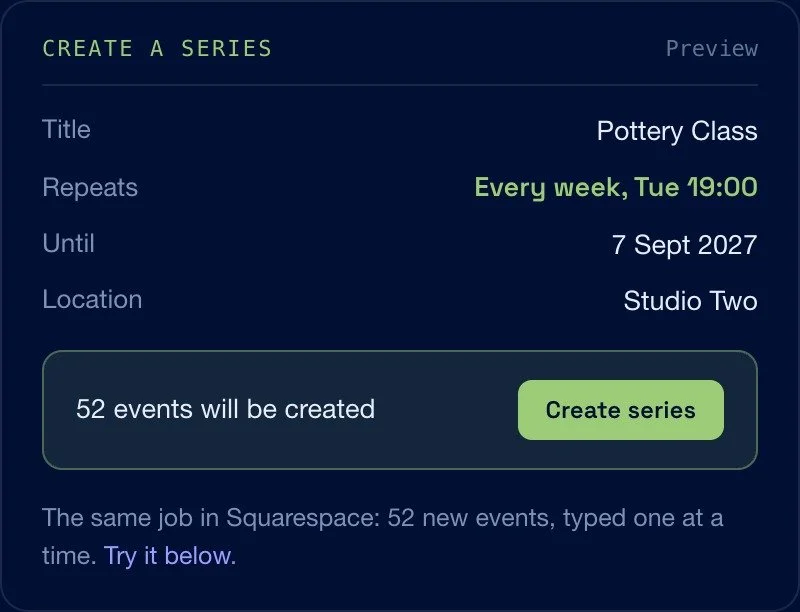
Events Pro adds recurring events and bulk editing to Squarespace 7.1. Squarespace Events handles a single date well, but it has no repeating event and no way to change many at once, so a weekly class or a season of dates means creating and editing each one by hand. Events Pro puts the whole calendar in one table. Build a repeating series from a single pattern, then change dates, times, venues, categories, tags and status across a whole selection at once. It runs inside your own Squarespace admin, on the calendar you already have, and nothing is written to your site until you confirm.
Key features
Recurring events: build a whole repeating series from one pattern, weekly, fortnightly, monthly or a custom interval, and choose when it stops
Bulk editing in one table: change dates, times, venues, categories, tags, status and featured across a whole selection at once
Move venues in bulk: reassign many events to a saved location when the hall or address changes
Merge duplicates: fold three spellings of the same venue, or stray tags, into the one you choose
Find and replace: across event titles, locations and descriptions
Tidy event URLs: rebuild them to a consistent pattern, without Squarespace's random tail
Duplicate to new dates: copies land as drafts for you to review before anything goes live
Needs attention checks: surface events missing a location, a time or a category before a client spots them
Safe by default: nothing is written to your site until you confirm, with an unsaved changes banner and a full revert
One payment: unlimited sites, free updates
Does Squarespace have recurring events?
No. Squarespace Events has no recurring or repeating event option, so each date has to be created as its own event. Events Pro creates the whole series from one pattern.
Can you bulk edit Squarespace events?
Not in Squarespace itself. Events Pro adds a table of every event in your calendar and applies one change, a date, a venue, a category, to a whole selection at once.
Where does it run?
Inside your own Squarespace admin, in your browser, using the session you are already signed in to. There is no third party server in between.
Select 40 events, change one thing, save once
Filter the calendar down to the events you mean, tick them, and apply the change to the whole selection. Nothing is written until you confirm, and a full revert is one click away.
Dates and times
Shift a whole run of events, change a start time across a season, or fix the times an import got wrong.
Venues
The hall changes and 24 events need the new address. Move them together, from your saved locations.
Categories and tags
Bulk add, update or remove, with autocomplete showing how many events already use each one before you commit.
Status and featured
Publish a season, unpublish last year, or flip the featured flag on any selection at once.
Find and replace
Across event titles, locations and descriptions, so a rename does not mean reopening the calendar.
Needs attention
A filter that surfaces the events missing a location, a time or a category, before a client spots them.
Build a repeating series, right here
The real Repeat panel, on a pretend event. Change the pattern and watch the dates rebuild.
Three spellings of the same hall, merged into one
Every import, every rename and every year of guest editors leaves a calendar with duplicate locations, stray tags and URLs nobody can read. Merge them into the one you choose and everything is reassigned to it.
One location, one address, one filter that finally returns everything.
- Event URLs left behind by imports
- Duplicate categories and tags
- Fields a migration mangled
- Any view exported to CSV
The Squarespace events jobs people search for
Calendars that repeat, and the people who maintain them
If the same thing happens every week, or the venue changes for a whole season, this is the job it was built for.
Venues and theatres
A season of dates, a run of performances, and a programme that changes twice a year.
Churches and community halls
Weekly services and hall bookings that repeat all year across several rooms.
Studios and class timetables
Fixed weekly classes, terms that start and stop, and a timetable that shifts in the holidays.
Markets and fairs
Every second Saturday, in the same place, for as long as the season runs.
Tours and gig listings
Dozens of dates, each in a different town, entered once and retagged later.
Studios and agencies
Client calendars you inherit, tidy up once, and hand back working.
Requirements
- Squarespace 7.1, on any commerce or business plan that includes Events
- An existing events page, or several, on the site
- Owner or administrator access to the site
- A desktop browser, Chrome, Safari, Edge or Firefox
- No plugins, no API keys and no third party server
Questions, answered
Anything else, get in touch and you will get a reply from the person who wrote the code.
The Squarespace events jobs people search for
Events Pro adds recurring events and bulk editing to Squarespace 7.1. Squarespace Events handles a single date well, but it has no repeating event and no way to change many at once, so a weekly class or a season of dates means creating and editing each one by hand. Events Pro puts the whole calendar in one table. Build a repeating series from a single pattern, then change dates, times, venues, categories, tags and status across a whole selection at once. It runs inside your own Squarespace admin, on the calendar you already have, and nothing is written to your site until you confirm.
Key features
Recurring events: build a whole repeating series from one pattern, weekly, fortnightly, monthly or a custom interval, and choose when it stops
Bulk editing in one table: change dates, times, venues, categories, tags, status and featured across a whole selection at once
Move venues in bulk: reassign many events to a saved location when the hall or address changes
Merge duplicates: fold three spellings of the same venue, or stray tags, into the one you choose
Find and replace: across event titles, locations and descriptions
Tidy event URLs: rebuild them to a consistent pattern, without Squarespace's random tail
Duplicate to new dates: copies land as drafts for you to review before anything goes live
Needs attention checks: surface events missing a location, a time or a category before a client spots them
Safe by default: nothing is written to your site until you confirm, with an unsaved changes banner and a full revert
One payment: unlimited sites, free updates